
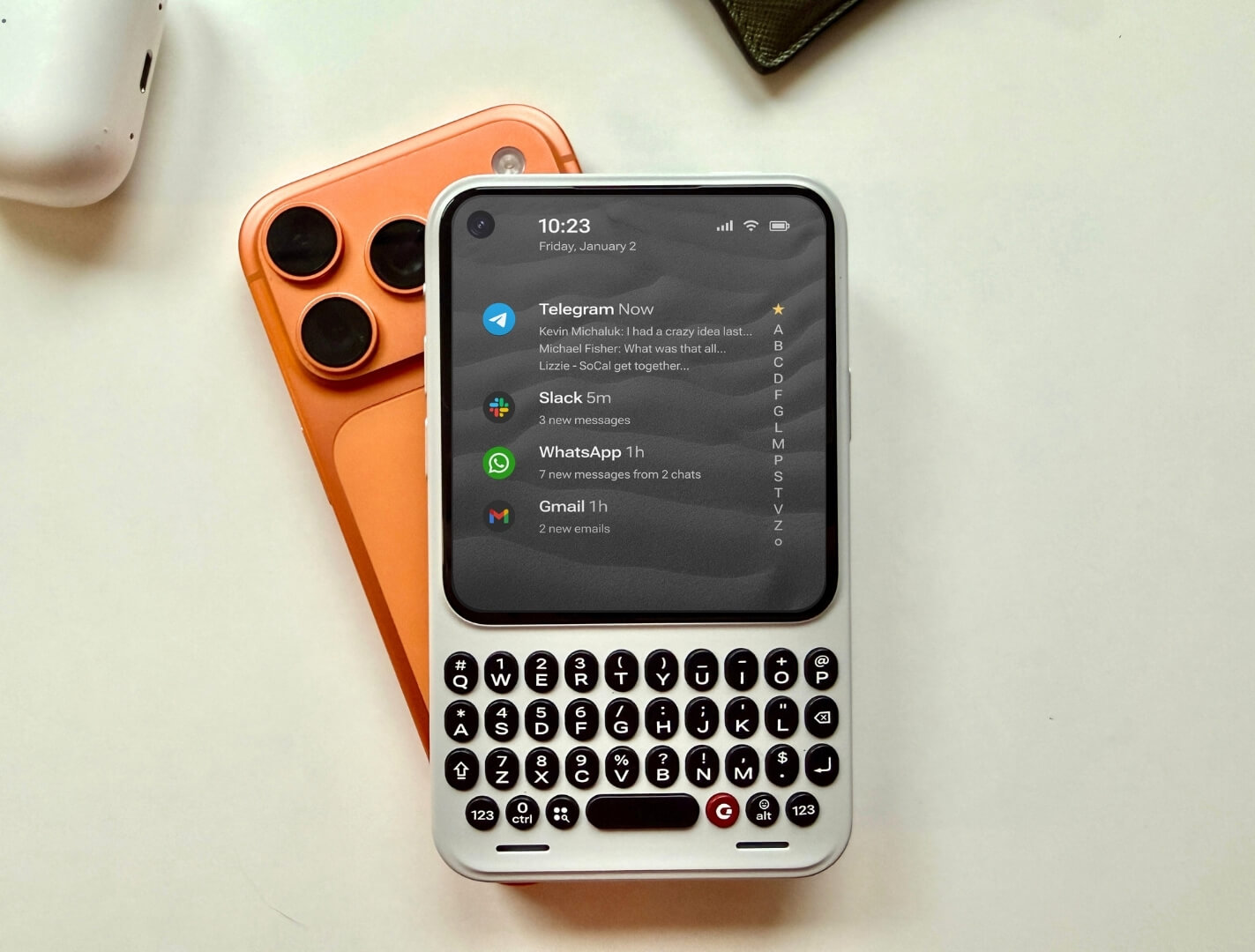
CES 2026 Reveal: Clicks Communicator Review – The Bold Return of the Keyboard Phone
The sea of glass slabs at CES 2026 was finally broken by a familiar yet revolutionary click. The Clicks Communicator emerged as one of the show’s surprise stars, promising a tactile typing renaissance. Our hands-on Clicks Communicator review dives into this daring Android device that blends nostalgic BlackBerry DNA with a modern “second device” philosophy. Priced at an accessible $499 ($399 for early birds), it aims not to dethrone your flagship, but to companion it. We’ve held the prototypes, grilled the creators, and analyzed the first impressions to answer the burning question: Is this a serious productivity tool or a beautifully crafted novelty for keyboard lovers?
Clicks Communicator Review: Introduction
In a market dominated by touchscreens, Clicks Technology made waves first with keyboard cases for iPhones and Pixels. At CES 2026, they leveled up, announcing their own standalone device: the Clicks Communicator. This Clicks Communicator review is based on direct interaction with non-functional prototypes at the show, which were impressively representative of final build quality. The device immediately strikes a chord with anyone who yearns for the confidence of physical keys. Running Android 16 with a customized Niagara launcher, the Communicator carves a unique niche as a dedicated messaging and communication hub, challenging the notion that our primary phones must be all things to all people.
Key Features & Design
The Clicks Communicator’s design is its first triumph. It’s not a rebadged OEM model; it’s a purpose-built statement.
- Tactile, Ergonomic Keyboard: The centerpiece. Keys are larger than those on Clicks’ iPhone cases, welcoming users with larger hands. The travel and click are reportedly tuned for a satisfying, productive feel.
- Premium, Personalizable Build: The polycarbonate body has a substantive, quality weight. The standout feature is interchangeable back covers—including colorful polycarbonate and premium leather options—allowing for easy personalization.
- Unique Notification System: A programmable RGB light ring encircles a side button (dubbed the “Prompt Key”). This “notification light on steroids” can be customized by contact (e.g., green for family, red for work), a feature beloved by early viewers.
- Modern Specs in a Classic Form: It houses a 4-inch 1080p OLED display, a MediaTek processor, 256GB storage (with microSD expansion), a 50MP main camera, a 4000mAh battery with wireless charging, and the hero of retro enthusiasts: a 3.5mm headphone jack.
- Fully Independent Android Device: It has its own 5G SIM slot and runs Android 16. It’s not a Bluetooth accessory but a standalone phone that can serve as your primary device if you choose.
Clicks Communicator Review: Pros & Cons
Analysis from CES hands-on sessions and early adopter reactions reveals a device with passionate appeal but specific use cases.
Pros
- Unmatched Typing Experience: For writing emails, documents, or messages, a physical keyboard offers speed and accuracy that touchscreens struggle to match. As tech reviewer Ola noted after handling it,
“The feel when having it in hands is amazing… I love how they put the display at the same height as the keys.”
- Brilliant Secondary Device Philosophy: It allevifies notification overload from your main phone, creating a focused communication tool. This separation can be a major productivity and mental health boost.
- Exceptional Build Quality & Design: The prototype quality shocked observers. The seams, weight, and finish feel premium, belying the company’s size. The removable backs add a fun, customizable element.
- Clever, Functional Nostalgia: The notification light and headphone jack aren’t just gimmicks; they are thoughtfully implemented features that users have genuinely missed.
Cons
- Niche Appeal: This is unequivocally not a device for everyone. The small screen and physical keyboard will feel limiting to users accustomed to large, media-consumption-focused slabs.
- Camera & Performance Compromises: With a MediaTek chip and modest camera specs, it’s not built for gaming, intensive multitasking, or photography. It’s a tool, not an entertainment powerhouse. As enthusiast Eric pointed out,
“This is not going to be a gaming device. This is not going to be a device that you’re going to use for photography, videos.”
- Software Support Questions: While Clicks promises 2 years of Android updates and 5 years of security patches, the long-term viability of a niche device from a small company is always a consideration.
- The “Second Device” Cost: At $499, it’s a significant investment for a companion gadget, even if it can function as a primary phone for the minimalist.
Target Audience & User Experience
Who is the Clicks Communicator for? Our Clicks Communicator review identifies three core user groups:
- The Productivity Purist: Writers, email-heavy professionals, and anyone who prioritizes text input above all else.
- The Digital Minimalist / Focus Seeker: Someone wanting to separate constant messaging (WhatsApp, Telegram, Signal) from their main device to reduce distractions.
- The Retro Tech Enthusiast: Fans of BlackBerry, Unihertz devices, or anyone who simply misses the tactile joy and distinct identity of a keyboard phone.
The user experience, based on the launcher demo, is centered on triage. The Niagara launcher streamlines notifications and app access, theoretically making the small screen highly efficient for its core communication tasks.
Performance & Value Assessment
As a performance tool for its intended purpose—typing and messaging—the Communicator’s hardware seems more than adequate. The value proposition hinges entirely on how much you value a physical keyboard.
Good Value For: The user who constantly fights with autocorrect, longs for typing confidence, or is overwhelmed by their primary smartphone. The early-bird price of $399 makes it a compelling experiment.
Poor Value For: The average user who consumes video, plays games, and uses their camera daily. For them, it’s an expensive sidegrade with limited functionality.
Compared to other keyboard options like the Unihertz Titan series, the Clicks Communicator wins on modern software support, cleaner design, and the focused “companion device” ecosystem approach.
Alternatives to the Clicks Communicator
If the Communicator intrigues you but you’re unsure, consider these paths:
- Clicks Keyboard Cases: For iPhone or Pixel users, this is a lower-cost ($139-$169) way to get a similar typing experience on your existing phone. Check Clicks Cases on Clicks.tech.
- Unihertz Keyboard Phones (Titan Series): More rugged, often with larger keyboards, but historically plagued by slower software updates and clunkier designs. Browse Unihertz Phones on Amazon.
- Bluetooth Keyboards + Your Phone: The ultimate in flexibility. Pair a foldable Bluetooth keyboard with your current smartphone for typing sessions, then detach for normal use. See Bluetooth Keyboards on Amazon.
The direct pre-order link for the boldest option is: Check Clicks Communicator on Clicks.tech.
Clicks Communicator Review: Final Verdict
The Clicks Communicator is a breath of fresh, retro-futuristic air. It is a phenomenally well-executed first hardware effort that understands its niche deeply. The build quality astonishes, the keyboard promises joy, and the notification light is a stroke of genius.
However, this Clicks Communicator review must emphasize its deliberate limitations. It is not, and does not try to be, a flagship competitor. It is a specialized tool—a scalpel in a world of Swiss Army knives. For its target audience of writers, focused communicators, and keyboard nostalgics, it could be a transformative device that reclaims productivity and pleasure from the touchscreen monotony. For the general consumer, it’s an intriguing but likely impractical CES novelty.
Final Recommendation: If you read this review and felt a pang of excitement, if you’ve ever cursed autocorrect or missed the satisfying *click* of a send button, the Clicks Communicator is worth your serious consideration, especially at the $399 early-bird price. It’s a rare, opinionated device in a conformist market. If you’re unsure, the Clicks keyboard case for your existing phone is a superb lower-stakes entry point to this tactile world.