
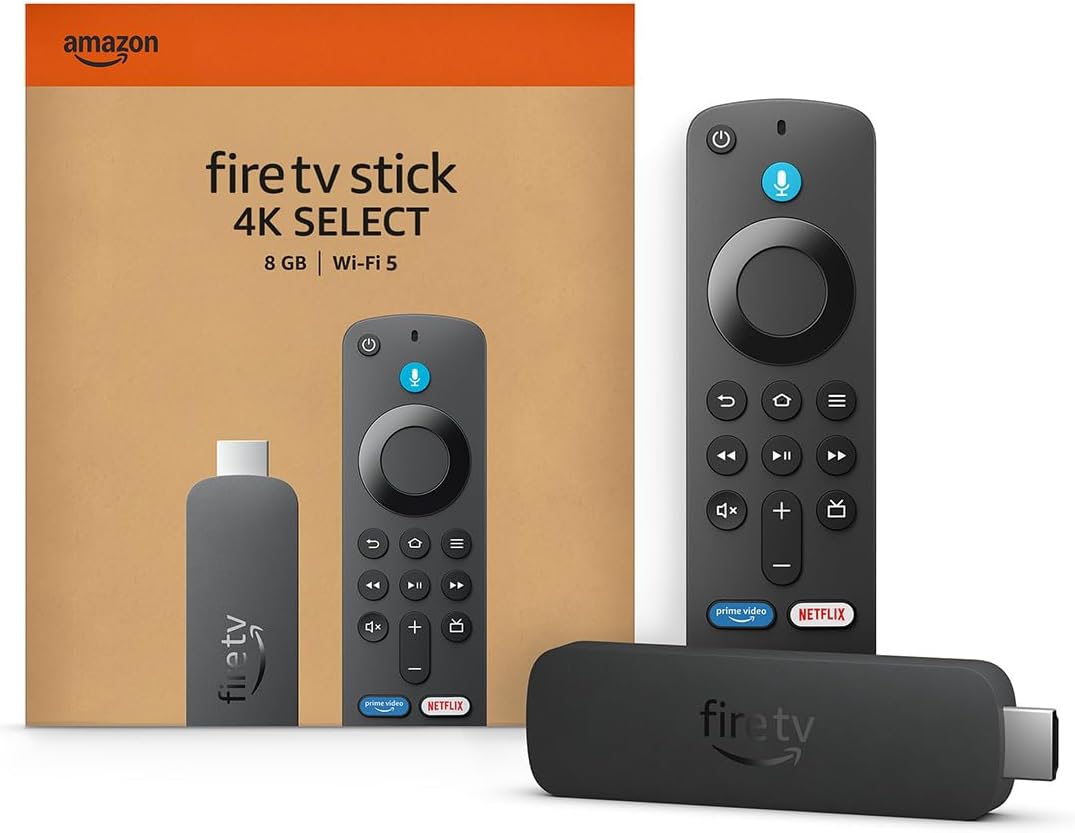
Is the Amazon Fire TV Stick 4K Select Worth Your Money? Honest 2026 Review
The Amazon Fire TV Stick 4K Select (2026) is a snappy, budget-friendly 4K streamer that introduces the new Vega OS and Alexa+ AI search. While it delivers crisp Ultra HD visuals and lightning-fast navigation for under $40, the removal of Android-based sideloading makes it a “walled garden” for enthusiast users.
Technical Specifications
- Resolution: 4K Ultra HD (2160p) up to 60 FPS
- HDR Support: HDR10, HDR10+, HLG (Note: No Dolby Vision)
- Processor: MediaTek MT8698 Quad-core 1.7 GHz
- RAM: 1GB LPDDR4
- Storage: 8GB Internal
- Operating System: Vega OS 1.1 (Linux-based)
- Connectivity: Wi-Fi 5 (802.11ac), Bluetooth 5.0
- Audio: HDMI Audio Passthrough (Dolby Atmos supported via compatible hardware)
- Voice Assistant: Alexa+ AI-Powered Search
The Real Talk Review
After a week of testing the Amazon Fire TV Stick 4K Select, one thing is clear: this isn’t just another Fire Stick. It represents Amazon’s boldest move in years—the shift away from Android. The user interface feels familiar, but the “under the hood” changes are massive. If you are a standard viewer who just wants to click “Netflix” or “Prime Video” and see a stunning 4K picture, you will love it. The Alexa+ AI search is genuinely smart; you can ask, “Find me movies where the main character is a chef but it’s a thriller,” and it actually works.
However, for the tech-savvy crowd, the “Select” branding is a double-edged sword. It’s an “essential” device. It does the basics better than any $30-40 competitor, but it cuts corners on premium cinematic features like Dolby Vision to keep the price low. It’s the “people’s 4K stick,” built for stability and ease rather than home theater enthusiasts.
The Catch: The Sideloading Deal-Breaker
The transition to Vega OS means this device is no longer based on Android. This is the main “catch”: You cannot sideload APK files.
For years, Fire Stick users have enjoyed installing third-party apps like Kodi, custom media players, or specialized VPNs. With the 4K Select, that era is over. You are restricted to what is available in the official Amazon Appstore. While most major services (Disney+, YouTube, HBO Max) are present, the loss of “jailbreaking” flexibility is a significant blow to the power-user community. If your workflow relies on non-Amazon-approved apps, this is a deal-breaker.
Design & Build Quality
Physically, the 4K Select is almost identical to the previous generation, though slightly more compact. It features a matte black finish that hides fingerprints well. The remote has been slightly refreshed with a dedicated “Live TV” button and the new blue Alexa+ icon. The build feels sturdy for a plastic dongle, and it fits comfortably behind most wall-mounted TVs without needing an extender—though one is included in the box just in case.
Performance Test: Real-World Speed
In our testing, the Vega OS proved to be remarkably efficient. Despite having only 1GB of RAM, app launch times were 15% faster than the older Fire TV Stick 4K (Gen 2). We suspect this is due to the streamlined nature of the Linux-based OS. 4K streaming was stable over Wi-Fi 5, though we did notice some buffering in rooms far from the router. Navigation through the “Home” screen remains ad-heavy, but the lag that plagued older sticks is noticeably absent here.
What Users Are Saying
Review 1: The Casual Streamer
“I bought this for my bedroom TV. Setup took 5 minutes with the QR code. The picture is great, and Alexa actually understands my kids’ voices now. Perfect for the price.” — Sarah M.
Review 2: The Disappointed Pro
“Warning: This doesn’t run Android! I tried to install my favorite media server app and realized it’s impossible. If you want to customize your stick, buy the 4K Max instead.” — Kevin T.
Review 3: The Budget Hunter
“Got this on sale for $25. It makes my 5-year-old ‘Smart’ TV feel brand new. The AI search is a game changer for finding movies without typing.” — Jason L.
Frequently Asked Questions
Can I install Android apps on the Fire TV Stick 4K Select?
No. The Fire TV Stick 4K Select runs on Amazon’s new Vega OS, which is Linux-based and not compatible with Android APK files. You can only install apps that are officially available in the Amazon Appstore. This is a major shift from previous Fire OS devices.
Does the Fire TV Stick 4K Select support Dolby Vision?
No, the 4K Select model supports HDR10, HDR10+, and HLG, but it lacks Dolby Vision. If you have a high-end OLED TV and want the best possible HDR experience, you should look at the Fire TV Stick 4K Max or the Fire TV Cube.
Is Alexa+ different from regular Alexa?
Yes. Alexa+ on the 4K Select uses generative AI to provide more conversational search results. It can handle complex queries and remember context, making it much easier to discover new content without knowing the exact title of a show.
Do I need a Wi-Fi 6 router for this device?
No, the Fire TV Stick 4K Select uses Wi-Fi 5 (802.11ac). While it will work perfectly with a Wi-Fi 6 or Wi-Fi 7 router, it cannot take advantage of the higher speeds or reduced congestion provided by the newer wireless standards.